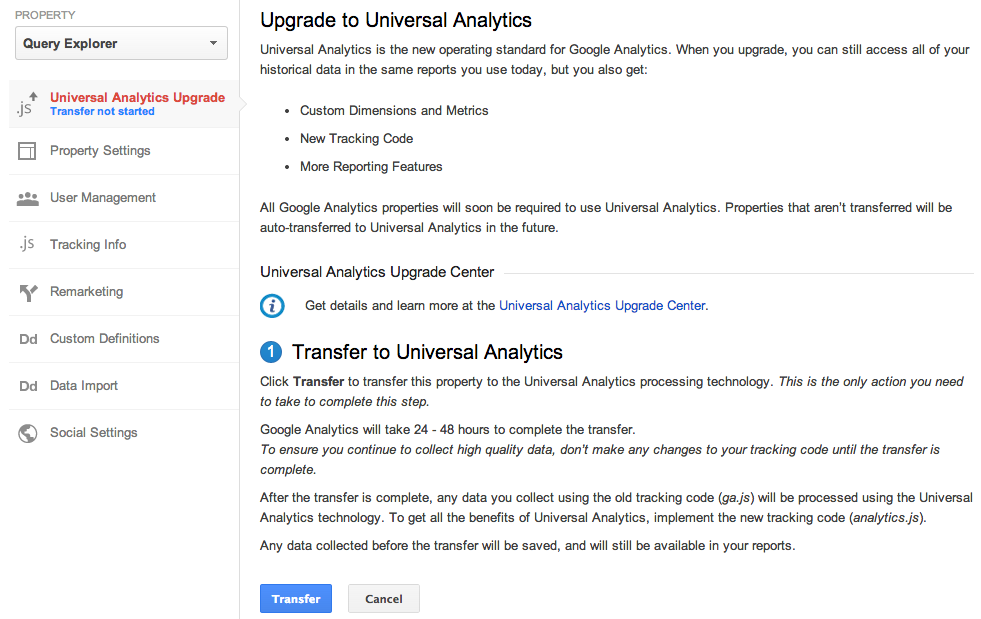
Last year we launched Universal Analytics, a new technology that allows you to measure customer interactions across platforms and devices. As we announced at the 2013 Google Analytics Summit, we’ve been working on a solution to help you upgrade your existing properties to the new infrastructure without losing any historical data.

Today, we’re announcing the Universal Analytics Upgrade Center, an easy, two-step process to upgrade your existing properties from classic Google Analytics to Universal Analytics.

Once you complete the upgrade process, you can continue to access all of your historical data, plus get all the benefits of Universal Analytics including custom dimensions and metrics, a simplified version of the tracking code, and better cross-domain and cross-device tracking support.

Getting Started

You can upgrade your classic Google Analytics properties into Universal Analytics properties by following these two steps:

Step 1: Transfer your property from Classic to Universal Analytics.
We’ve developed a new tool to transfer your properties to Universal Analytics that we will be slowly enabling in the admin section of all accounts. In the coming weeks, look for it in your property settings.


Step 2: Re-tag with a version of the Universal Analytics tracking code.
After completing Step 1, you’ll be able to upgrade your tracking code, too. Use the analytics.js JavaScript library on your websites, and Android or iOS SDK v2.x or higher for your mobile apps.

Universal Analytics Auto-Transfer

Our goal is to enable Universal Analytics for all Google Analytics properties. Soon all Google Analytics updates and new features will be built on top of the Universal Analytics infrastructure. To make sure all properties upgrade, Classic Analytics properties that don’t initiate a transfer will be auto-transferred to Universal Analytics in the coming months.

Upgrade Resources

To answer common questions, we’ve put together the Universal Analytics Upgrade Center, a comprehensive guide to the entire upgrade plan. This guide includes an overview of the processtechnical references for developers, and a project timeline with phases of the overall upgrade.

We’ve also included FAQs in the Upgrade Center, but if you need more information, you can also visit the new Universal Analytics Google Group to search for answers and ask more specific questions.

We’re excited to offer you this opportunity to upgrade, and hope you take advantage of the resources we’ve created to guide you through the process. Visit the Universal Analytics Upgrade Google Group to share your comments and feedback. We’d love to hear what you have to say!

Posted By Nick Mihailovski, on behalf of the Google Analytics Team
Google sent shock waves through the SEO community recently when it decided to encrypt all of its search query data and push “Not Provided” keyword results to 100%. While this change has been a long time coming, many SEOs are now struck with the stark realization that they are going to have to devise new ways to offer their clients the type of analysis and valuable metrics that they have become accustomed to with almost no keyword data.
Like so many aspects of SEO, Internet marketing requires us to extrapolate conclusions from incomplete data. The complete lack of access to referring keyword data is another obstacle that must be overcome, but it also presents a unique opportunity to improve and leverage the structure of your website to help you claim some of that lost keyword data back.
A properly implemented site architecture can help chase those keyword demons away and allow you to track your online marketing campaigns with the accuracy and effectiveness that was normally reserved for the long-passed days when keyword data wasn’t the endangered species that it is today.

Siloing: It’s All about the Structure

Website siloing is a way of organizing your site’s content to establish clear themes. Proper site structuring can go a long way towards improving your site’s usability and visibility. Bruce Clay has been training website owners on the intricacies of site siloing for more than 7 years, as the SEO siloing article on bruceclay.com explains (shameless plug intended):
“In order to rank for keywords within Google, Yahoo and Bing, a site must provide information that is organized in a clear structure and language that search engines understand… The term siloing originated as a way to identify the concept of grouping related information into distinct sections within a website. Much like the chapters in a book, a silo represents a group of themed or subject-specific content on your site…”
A siloed website architecture builds themes around keyword sets. By optimizing specific sections of your website for a set of keywords in a particular theme, you can make assumptions about the sources of your organic landing page traffic to that “silo” or section.  Take this a step further by assigning your highest value keywords to specific pages in your silo (something you should be doing already) and you’ll have detailed data about the keywords that searchers use to land on specific pages of your site.

Siloing in Action

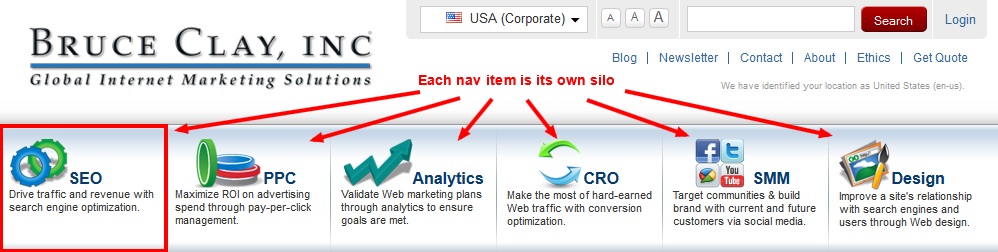
We’ll use the bruceclay.com website to illustrate our point. You’ll notice that our website is siloed across several themes. For the purposes of this exercise, we’ll look at the SEO silo, whose pages are contained in the directory bruceclay.com/seo/.
siloed site navigation
Our site has a physical silo structure, which means that the siloed pages all appear in an actual subdirectory on the site, in this case, /seo/; this is an important factor in our ability to track organic traffic through analytics.
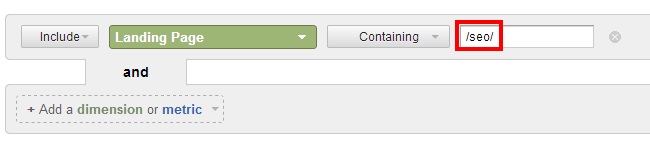
In order to view our traffic on a silo basis, we go to the organic traffic report and make our primary dimension “Landing Page”. Next we add a filter that includes all results that contain the silo’s directory. In our case, we add an inclusive filter with the value “/seo/”. This allows us to view the landing page traffic for pages that appear in the /seo/ subdirectory only.
organic traffic reportThe resulting report offers us the organic search traffic for our SEO silo, whose pages all have specific keywords assigned to them. Armed with historical ranking data, we can begin to assign traffic averages to keyword ranking positions for specific time periods. This data can be extremely valuable as it offers us specific data on traffic fluctuations as they relate to increases and decreases in rankings.
Essentially, we have created a new type of keyword report, one that looks at a targeted section of our site and give us insight into keyword referral data by concerning itself with a finite list of keyword phrase possibilities.
While this type of analysis does not replace true keyword referral data, it does give us great, actionable insights into the effectiveness and shortcomings of our SEO campaigns. Long-tail traffic and specific keyword variations can be difficult to track with this type of analysis, but as explained earlier in this post, in the absence of true visitor keyword data, SEOs are forced to extrapolate conclusions from incomplete data.
Keywords have always been used as an important metric in the analysis of the effectiveness of SEO campaigns. As access to that data has shrunk over the past several years, it has been important that SEOs adapt their strategies and reporting to analyze the data we do have access to, specifically data that websites themselves own (as opposed to data being provided from outside sources, like search engines). Our agency has long preached that SEO campaigns should be judged by their ability to increase traffic, and little about that philosophy will change, regardless of how search engines treat the data that they report about searchers.
Content Delivery Networks (CDNs) have revolutionized web hosting during the past few years. Rather than hosting your website a single server, you can distribute the files and load across multiple systems.

What Files can be Hosted on a CDN?

Most CDNs are used to host static resources such as images, videos, audio clips, CSS files and JavaScript. You’ll find common JavaScript libraries, HTML5 shims, CSS resets, fonts and other assets available on a variety of public and private CDN systems.

CDN Services

There are a number of free CDNs offered by Google, Microsoft, Yahoo and other large web organizations. For example, few people host their own videos when YouTube and Vimeo offer amazing free services. Similarly, if you require jQuery, you can load it on any page using:

<script src="http://ajax.googleapis.com/ajax/libs/jquery/1.6.4/jquery.min.js.js"></script>
or

<script src="http://ajax.aspnetcdn.com/ajax/jQuery/jquery-1.6.4.min.js"></script>
Alternatively, you could use a private commercial CDNs such as Amazon S3Microsoft Windows Azureand MaxCDN to host your own files.

The Benefits of Using a CDN

There are several reasons why a CDN could benefit your website and company.
1. Different domains
Browsers limit the number of concurrent connections (file downloads) to a single domain. Most permit four active connections so the fifth download is blocked until one of the previous files has been fully retrieved. You can often see this limit in action when downloading many large files from the same site.
CDN files are hosted on a different domain. In effect, a single CDN permits the browser to download a further four files at the same time.
2. Files may be pre-cached
jQuery is ubiquitous on the web. There’s a high probability that someone visiting your pages has already visited a site using the Google CDN. Therefore, the file has already been cached by your browser and won’t need to be downloaded again.
3. High-capacity infrastructures
You may have great hosting but I bet it doesn’t have the capacity or scalability offered by Google, Microsoft or Yahoo. The better CDNs offer higher availability, lower network latency and lower packet loss.
4. Distributed data centers
If your main web server is based in Dallas, users from Europe or Asia must make a number of trans-continental electronic hops when they access your files. Many CDNs provide localized data centers which are closer to the user and result in faster downloads.
5. Built-in version control
It’s usually possible to link to a specific version of a CSS file or JavaScript library. You can often request the “latest” version if required.
6. Usage analytics
Many commercial CDNs provide file usage reports since they generally charge per byte. Those reports can supplement your own website analytics and, in some cases, may offer a better impression of video views and downloads.
7. Boosts performance and saves money
A CDN can distribute the load, save bandwidth, boost performance and reduce your existing hosting costs — often for free.

1. You can't go wrong with a G+ post about G+.
Perhaps the abundance of posts about G+ is what makes G+ a better and a more explained social media channel to dive and be in. Have there ever been a day without a Google+ post about Google+? What's interesting, is that each and every post is unique. Hopefully, things I learned while spending my time on G+ will make this post an interesting read too.

2. Too many people come to Google+ for SEO benefits. But only the few reap it all.
Admittedly, perceived SEO benefits attracted my attention to Google Plus and social media in general. It was the bigger picture that got me to stay. By now, most of you have learned 1000s of ways how Google+ can be helpful. 3 Biggest things that got me to stay here are:
- these lessons I learned and the the new ones yet to be learned
- easy access to deep knowledge and smart people all in one place
- ability to talk and be heard
When understood, G+ opens myriads of opportunities, including SEO. Those who get it stay and those who stay reap it all. Notice, I said "all". That's because those who don't understand the entire thing don't get anything. 

3. Everyone wants to be heard. Not everyone will be.
Yap, everyone wants to be heard. Does everyone deserve to, though? Probably. Well, maybe not. That's not the point. The point is, only those who work hard get what they desire - love, friendship, money, things, attention. Have a strategy, build your reputation, get heard, get what you want. It’s that easy. Yet it’s so difficult, especially when results are slow to come, and you know you must keep it going.

4. Your resources are limited. Spend wisely.
Don't we all want too many things in our life? I often think (I wish I could say "thought") I can do more, get more, spend more. I have a lot to say but can't say it all. I want to do many good things (and sometimes bad, not bad bad, just bad) but can't do them all. What's the problem? Resources are limited. To succeed in social media, spend your resources wisely - prioritize, learn to say no, take good care of your own business. Being so is especially necessary and especially difficult when it comes to unlimited possibilities of G+.

5. Popularity, Influence and Knowledge are misunderstood.
Is knowledge equal influence equal popularity? Yes, if you are knowledgeable, influencial and popular. In most cases, though, these things don't come all at once. That’s because Influence comes from the Latin, "influere" which means "to flow into". Knowledge alone won't make you influential. You must always earn people's attention, or in other words, get them to "flow into" your ocean of knowledge (this is when knowledge in marketing and sales helps big time). Enough influence may also make you popular, but not always. You may stay influential in a niche and never get out to the masses. 
Some of us sometimes like to complain about popularity and/or influence that are not deserved. Keep in mind, where you want to be - knowledgeable, influential, or popular - is your choice. Where you end up being is mostly the other people's choice. So if someone is popular and/or influential, that’s because they both desired and deserved to be so.

6. Hard work gives more work. Connections make money.
It's not a secret, if you want to have enough work, you need to work hard for those who hire you - employers or clients. But just working hard won't make you rich. At best, you can ensure you have enough work to do to keep you afloat. The biggest and well kept secret of getting prosperous is networking. Or do you really think billion-dollar businesses start in a garage? That's how social media is here to help. Make new connections, learn from these connections, help others and they will help you. Not saying G+ alone will make you rich, but it's a dam’ good start for your own microbrand. Getting successful on G+ is also a natural step for established businesses looking to expand online.

7. Social Media Marketing needs a strategy. Without strategy, it's social waste of time.
Probably the biggest reason why Facebook is deemed a waste of time is lack of information about Facebook. Those who don't get Facebook, can't come up with a strategy and their time on FB becomes a waste. Somehow, Google and the community it built on G+ did a much better job at explaining the underexplained. There are myriads of posts on Google Plus that help you come up with a strategy. 
Commitments and persistence in social media marketing is what makes people and brands successful. However, you also need something to commit to. So, come up with a strategy and follow it. It's ok if you fail, just don't give up. Adjust your strategy and move on. And remember - resources are limited and social media makes it easy to make waste.

8. "To receive more, give more" is often misunderstood.
We all know we need to give in order to get, don't we? What I didn't know is what makes some ultra-successful while others barely keep afloat. How's that some people don't seem to give as much and receive much more than the others? But others give all they have and receive seemingly nothing back. It's all about the balance. You need to take care of your own goals first. But because this world is so interconnected (especially in this age of social media), one can achieve nothing without helping others to achieve their goals. Neither can one achieve anything if they don't take care of their own stuff. So keep thing in balance. Again, remember, your resources are limited and sometimes you must be a bit selfish.

10. Be unique. Do what you do best.
Learning from the success of others is always good. Copying what other people do in its entirety is impossible and won’t make you greatly successful no matter how well you mimic success of others. That's because everyone is unique. To have success in social media marketing, people and brands must do what they can do best and learn what they can learn best. In other words, each and every individual or group of individuals should radiate what's unique about them. This will gather unique, perfectly matching audience around them. Evangelism earned.

11. Pay Attention.
When you pay attention to little details others don't see, a world of opportunities opens itself up. Taking advantage of these little things is what makes your success big and resounding. 9 is missing btw. Did you notice? :-)
Google Analytics offers an easy entry into the world of customer journey analysisfor quite some time now with its Multi Channel Funnels reports. This year Google has made another big step and enhaced it with the Attribution Modeling Tool which allows us to create and compare various attribution models.
For online and performance marketing people this is extremely important and helpful - and complex at the same time.
With some simple visualization techniques it is much easier to gain insights - this article shows how.

Preparing the Attribution Models

The tool allows us to compare up to three models at the same time. In this example we want to examine the beginning, the middle part and the completion of the journeys. Therefore we choose
  1. first interaction - a standard model
  2. supporter - a custom model
  3. last non-direct click - a standard model
The “supporter” should include all touchpoints after the first and before the last click. For this we create a new model based on the “position based” model and allocate 100% of conversion credits to middle interactions and zero to the others:
The Attribution Model "Supporter"
It makes a difference whether we choose “last interaction” or “last non-direct interaction” since in the latter case “directs” have less impact. Whatever implication this may have needs to be analysed in further comparisons.
Now this is the result we get in Google Analytics:
Attribution Modeling in Google Analyitcs - Model Comparison
Note: In this case we work with a custom channel grouping - named “custom grouping”. This is another important strength of this tool. Here, for example, we chose to put all brand keywords in their own channel “brand search” because we believe that those searches are very different compared to generic searches and should not be included in the standard search channels (organic and paid).

The figures show it all - don’t they?

We can definitely gain some insight out of this with some experience and time at hand. Also the delta columns on the right help, specially the arrows.
But does everyone really get what we can see here? And more importantly: what can we deduce from it?
Frankly, I’m not sure. This is why I click on the small grey icon in the top center (just beneath the “Conversions & Value” dropdown menu). Now the table changes as follows:
Attribution Model with visual comparison in Google Analytics
The color gradient immediately shows which channel
  • introduces the contacts,
  • is supporting
  • or closes the deal.
In our example, we see in lines 5 and 6 that e-mail and organic search (without brand keywords) are not introductory channels but have a supporting and finalising effect. Lines 1-3 show in this case a strength throughout all brand channels supported by paid search.

What can I deduce from the attribution models

So what? These initial findings are a good analysis of the current situation. As a next step, however, we can go into more detail by means of drill-downs.
What search campaigns do help, in which phase and to what extend? Which channels are initially important so that someone will close the deal via the brand search in the end? If I change the email frequency, what happens then? (To name just a few questions ...)
This specific example does not only show what insight we can potentially gain from it but also the complexity when we want to derive new strategies: It won’t be possible to stop the clear focus on brand as shown above from one day to the other - but it will be possible to tackle it in a more targeted and controlled way.

I want that too!

Great - here you go:
To do this yourself, our free extension for Google's Chrome browser, namedTable Booster, is sufficient. It can be downloaded from the Chrome Store here. All of the features this tool offers when using Google Analytics, can be found here (there are lots more!). Please rate the plugin in the Chrome Store - many thanks!
If we can help you in analyzing your customer journeys: please contact us - this is our (exciting) job :-)
And if you liked this article, then it would be great if you share it:
The first place to start with any Google Analytics event is to develop an understanding of the composition of the necessary code. Custom events are implemented by adding an HTML event to an element of your web page (e.g., clicks, loads, mouse-overs, etc.) and then using some of Google's standard Google Analytics JavaScript to send event data to your account.
anatomy-of-a-google-analytics-event
  • Google Analytics push: The "_gaq.push()" part of the code is what connects to the HTML of your page and signals to Google Analytics that data needs to be sent to your account.
  • Category: Events are best organized into different categories depending on the behavior or functionality they track (e.g., video, ads, links, etc.).
  • Action: Think of actions as the verbs that correspond to how people interact with what you're tracking (e.g., plays, views, clicks, etc.).
  • Label: An optional value, labels let you associate data with custom events (e.g., names of videos, URLs of clicked links, user-provided values such as ZIP codes, etc.).
  • Value: Another optional field, you can use value to store integers with your events (e.g., price, time codes, etc.).
  • Interaction: Yet a third optional field, the non-interaction value can be set to "true" or "false" and dictates whether your event will contribute to your site's bounce rate.
Before we get into the details of our custom events, it's worth pointing out that while these examples do require a little working code knowledge, the technical bits aren't as bad as they seem. Custom events are pretty easy once you get the hang of them, and it's very likely you're working with developers who are more than capable of implementing everything described in this post.
That said, you can use this resource to add custom events to your site or, at the very least, get some great ideas to discuss in detail with your developer. So, without further ado, let's hop into our 10 event examples so you can see how to use each part of a custom event to give you some solid ideas about what to tackle first on your own site.

1. Tracking Clicks and Click-Based Downloads

Let's start off with a basic example of tracking when someone clicks on a link that isn't typically tracked on your website. The most common two examples here would be a link that leads to an external website or if someone clicks on a link that leads to a resource on your website that doesn't have the Google Analytics code installed (e.g., a PDF download).
google-analytics-custom-event-downloads
How to Use This Custom Event: Use this custom event in conjunction with onclick events so you can track when people click on links that lead away from your site. Examples of these would be referral programs, ad deals, and any other cases in which users leave your site to visit others. Also, this is the best custom event for tracking PDF downloads – bonus points go to you if you pair a PDF download custom event with a goal in your Google Analytics profile to measure resource downloads as a form of conversion.

2. Tracking Lightbox Conversions

Tracking goals on your website typically consists of specifying URLs that correspond to "thank you" pages on your website. Some sites, however, allow users to complete goals through a lightbox or other dynamic pop-up-like code that doesn't redirect folks to a new URL. Use this next example to track events of this nature.
google-analytics-custom-event-conversions
How to Use This Custom Event: Have this event fire in cases where any dynamic "thank you" message loads when a user completes an action that leads to a lightbox or pop-up, such as with downloads, registrations, log-ins and other such actions. Remember, custom events can also trigger goals in your account, which is when the real magic happens. This event can help bring conversion rate metrics to website functionality that you currently might be tracking.

3. Tracking Affiliate Ad Clicks

Affiliate marketers typically receive special HTML from affiliate networks, which allows their business partners to track link clicks and keep track of sales, leads and payments. This tracking will get you paid, but won't help you determine which of your affiliate links are making you the most money. Custom events are a perfect solution for tracking affiliate links.
google-analytics-custom-event-ad-clicks
How to Use This Custom Event: Implementation of this custom event should be pretty easy. Take the HTML provided by your affiliate network and add an onclick event to each of the affiliate links on your site. Be sure to use a custom event label to distinguish each affiliate add on your website. You'll be able to determine which of your affiliate ads are performing the best and which ones need reworking.

4. Tracking Form Errors

Google Analytics custom event tracking can be integrated with form fields on your important registration and check-out processes. As a result, you can understand which errors are most common when users go to submit their information. You'll know when certain errors impede conversion because they either confuse or disgruntle your users.
google-analytics-custom-event-form-errors
How to Use This Custom Event: Employ a series of custom events on your form with each event representing a field on that form. Your category should define which form is flagging errors; youraction should define each form field; and your label can be dynamic, pulling in both a description of the validation rule that triggered the error and the value entered that broke the rule, separated by a pipe (i.e., "|"). This one may require developer assistance.
Once set up, you can then dive into a custom report that quantifies and stratifies the most critical errors on your forms. At that point, you can assess the root causes of the errors by inspecting the values users are entering. Finally, you should then either relax your validation logic or include better help text to minimize the number of errors impeding your most important conversion activities.

5. Tracking Engagement With Embedded Maps

Google+ Local reporting tells you when people request driving directions to your business. Having the same functionality on your website can be useful in determining how online drives offline sales. Google lets you embed your map listing onto a webpage, but there's not a good way to hack that embed code to tell you when people click on the link to request driving directions.
Alternatively, you can create a custom map embed code using Mobilefish's API utility. This approach will allow you to format the HTML of the map embed to your liking, complete with a custom event ready to track driving direction requests made by users.
google-analytics-custom-events-map-tracking
How to Use This Custom Event: As mentioned, the first step with this event is to create a map embed using the Mobilefish API. You'll need to generate an API key for your Google account – don't worry, it's easy – and fiddle with the settings so your map embed appears as intended. There's a section of the utility dedicated to the HTML inside the white callout text typically shown in Google+ Local. It's in this section that you'll create an HTML link to the driving directions. Wrap the link in the onclick event with your custom event code and you're in business. Check out this college campus page for an example of how to use Mobilefish to create map embeds.

6. Tracking Video Engagement and Activity

Embedding videos on your website can be great for engagement, but it could also be that no one is watching them at all. Some video players track video engagement for you (e.g., YouTube and Wistia), but it's usually independent of your web analytics. This custom event technique can help you connect video engagement with the specific behaviors they're meant to promote (e.g., conversion) by tracking plays, starts, stops, and other forms of video engagement when users interact with the video player.
google-analytics-custom-events-video-tracking
How to Use This Custom Event: This custom event will only be available for some video players, and will typically involve integration with the video player itself. Luckily Wistia.com is an awesome video player and includes a complete guide to Google Analytics custom event video integration. In general, you'll want to use your action to specify the different activities associated with your video player (e.g., play, pause, skip, etc.), and you'll use your label to specify the title of the video.

7. Organic Rank Tracking with Custom Events

This next one is admittedly less and less useful as "(not provided)" continues to rob keyword data from your reports. This event seems incredibly tricky, but once set up, a single script on every page can turn your Google Analytics account into an organic rank tracker.
google-analytics-custom-events-rank-tracker
How to Use This Custom Event: This custom event demonstrates how versatile events really are. The event is placed on every page on your site – likely through inserting it into your header or footer. As the page loads, the script that triggers this event looks at the destination URL on your site and the referring string (the URL of the Google search) and extracts a few key values: the keyword used in Google is sent to your action; the destination URL is used as the label; and the organic ranking is sent to the value field.
It's also worth pointing out that this custom event is the first in our list to include the non-interactionvalue of true. This tells Google Analytics that firing the event should not be factored against your bounce rate. The event fires simply by virtue of the page loading, not through interaction of your users, so you wouldn't want to use a non-interaction value of false or you'd end up with a 0 percent bounce rate on every page.
This Google Analytics custom event may require reading the full instructions in order to implement properly, so be sure to check out AJ Kohn's blog post for more details.

8. Tracking Conversion Rate Optimization Variations

Conversion rate optimization through tools like Visual Website Optimizer or Optimizely is becoming a mainstay in many digital marketing departments. Some tests are simple and can rely on the onboard tracking, but some tests are more difficult. The use of custom events to record which variation of content your visitors receive is handy because you may want to do a deeper analysis on who saw what.
google-analytics-custom-events-cro-variations
How to Use This Custom Event: This is an awesome custom event to use if you're passing conversion rate optimization testing information downstream (e.g., from a lead system into a sales system). You can see if your gains in lead conversion established on the website persist all of the way through the sales process or if they only work to artificially widen the funnel further upstream.
To set up this event, load the custom event HTML when the content loads for each variation in your test. Use the label field to indicate differences in tests and variations within your test. Also, be sure to use the non-interaction value of true again with this custom event because content loading on your site does not constitute user engagement.

9. Tracking Article Content Consumption

Thank Google Analytics evangelist Justin Cutroni for this next event. When people talk about tracking article engagement, social shares (e.g., Google Analytics social tracking) and amplification seem to be top-of-mind. Article consumption comes before social sharing and yet we rarely track it.
How can someone share something if they didn't read it? This custom event allows you to measure consumption of the page as a number from 1-100 based on how far users scroll on your web page.
google-analytics-custom-events-article-consumption
How to Use This Custom Event: Definitely read Cutroni's post to implement this Everest-sized event. Actually, this tracking will consist of multiple custom events. First, you'll load the event shown above when the page first loads, using the page's URL as the label and using "100" as thevalue. Make sure non-interaction is set to true.
Next, you'll set up another custom event when the user first scrolls on the page. Tweak the first custom event you created by changing the value to "75" and by removing the non-interactionvalue. Create a third event that fires when the user reaches the bottom of the article, being sure to change the value to "50." Finally, create a fourth event that fires when a user reaches the bottom of the page – this event should have a value of "25."
Once you've set up all of these events on your blog, you'll be able to export the values from all of the events and create an index of your most popular articles. Higher numbers mean less content consumption while lower average numbers indicate your most engaging content.

10. Tracking Interactions with Custom Widgets

The last Google Analytics custom event we'll discuss is representative of the infinite number of custom-built widgets and utilities used on websites across the web. By default, none of this engagement is trackable, but proper analytics planning as part of the requirements process when developing your widgets can ensure that you'll never build functionality onto your site without knowing how it's used.
google-analytics-custom-events-tracking-widgets
How to Use This Custom Event: This event is probably the most abstract, so let's use a real life Google Analytics higher education case study. Rasmussen College implemented a tuition estimator on its site and wanted to know how a user's intended program of study, geography and number of transferable credits influenced their interest in the price of a program. They piped several user-entered values from the calculator into the label field (i.e., ZIP code, degree level and academic program) and the transferable credits into the value field by firing an event when users hit the calculate button. This level of insight into price sensitivity wouldn't be possible without the use of custom events.
Previous PostOlder Posts Home